

 Barker Research · Published October 14, 2026 ·
 1. Execution Cost: Fees Plus the Spread Between the Two Legs' Fills
Funding builds up slowly day by day, but execution costs hit the moment you trade. A full round trip takes four trades: buy spot, sell spot, open the perp short, close the perp short. Cost = four trading fees + the basis between the two legs' fill prices. The order book's bid-ask spread, slippage from eating through several price levels, and price moves between the spot fill and the perp hedge all end up in that leg spread. A favorable spread can offset part of the fees; an unfavorable one adds on top of them.
Using the example from the last article: 20k USDC of capital, a one-leg position of 1.5x, buying 30k USDC of spot and shorting the same value of perp. At the official base fee rates as of October 14, 2026, spot maker / taker is 0.040% / 0.070% and perp is 0.015% / 0.045% (a maker order rests on the book and waits for someone to fill it; a taker order fills immediately against orders already on the book). Take spot as maker and perp as taker, and assume that on entry the perp sell price is 2bp below the spot buy price (1bp = 0.01%), and on exit the perp buyback price is 3bp above the spot sell price:
| Cost item | Amount (USDC) | Calculation |
|---|---|---|
| Spot fees (maker, open + close) | 24 | 30k × 0.040% × 2 |
| Perp fees (taker, open + close) | 27 | 30k × 0.045% × 2 |
| Entry spread | 6 | 30k × 2bp |
| Exit spread | 9 | 30k × 3bp |
| Round-trip total | 66 | 0.33% of capital |
Using the last article's 11.3% annualized return after borrowing costs, 20k of capital earns about 2,260 USDC a year, or about 6.2 USDC a day. Those 66 USDC take about 11 days of earnings to win back; if you only hold for 30 days, they eat about 36% of the returns over that period.
The spread items in the table are no smaller than the fees: with a 30k USDC leg, every 1bp of spread is 3 USDC. If the book thins out or prices move fast while you hedge, paying an extra 10bp costs 30 USDC, more than the roughly 25.5 USDC in fees for one entry. Fees are set by the fee schedule, but the spread depends on when and at what price you fill. That is exactly why the program calculates the spread before entering. Personal fee rates change with trading volume, staking and other discounts, and actual amounts also move with the token price.
Why Spot as Maker and Perp as Taker
Using maker orders on both sides gives the lowest fees for a round trip (about 33 USDC), but the two orders queue separately: spot might fill while the short has not yet, and during that gap the account is exposed to price moves. Using taker orders on both sides (about 69 USDC) fills fast, but costs more in both fees and crossing the book.
Our compromise: spot rests as a maker order waiting for a better price, and each time part of it fills, the perp immediately hedges that part with a taker order (about 51 USDC). Before placing the perp order, the program checks the available depth and caps the size of each order to control taker slippage. A normal exit also uses spot maker and perp taker; in an emergency reduction, managing risk comes first.
2. How Long Is It Worth Waiting for a Better Spread
The program walks through the perp order book level by level for the planned order size to estimate the average fill price of the short, then compares it with the spot maker price. The result is the fillable spread estimated from the current order book, with the slippage from eating multiple price levels already included. Actual cost is ultimately settled using the average fill prices of both legs.
Two Thresholds: Post at 3bp, Keep Above 1.5bp
We have used several sets of parameters in practice. Here we use the 3bp / 1.5bp set to illustrate:
- Post threshold, 3bp: only when the spread reaches this level does the program post the spot buy order, and then it still has to wait for the order to fill. On a 30k USDC leg, a +3bp spread earns back about 9 USDC on its own, covering over a third of the fees for one entry (about 25.5 USDC).
- Keep threshold, 1.5bp: once posted, if the spread falls back to 2bp the order stays; if it drops below 1.5bp, the unfilled part is canceled. The buffer between the two thresholds prevents repeatedly posting and canceling near the threshold, and preserves the order's place in the queue.
But in the order books we observed, basis (the perp price relative to spot) was negative most of the time: the price you can sell the perp at is below the price you buy spot at. Calculated from the top of the book every minute from July 16 to October 13, it was negative about 67% of the time, with a median of about -1.9bp; it reached +3bp only about 15% of the time, and this varied a lot by month: about 6% in July, about 21% in August and about 9% in October. Large orders also eat through several price levels, so the spread you actually get is lower still.
So with the threshold at +3bp, you may wait a long time, even several days without finishing your entry. To go faster, you can lower the threshold to around -2bp based on the current book. The share of time that meets the condition rises from about 15% to about half, at the cost of paying about 2bp more per trade (about 6 USDC on a 30k USDC leg); the keep threshold should be lowered to match, leaving a buffer.
Waiting has a cost too: each extra 1bp you hold out for improves things by about 3 USDC, while 20k of capital earns about 6.2 USDC a day once the position is built. Making the whole sum wait an extra day for 1bp may not be worth it. A high threshold gets better fills but waits longer; a low threshold builds the position faster but pays more spread. We also adjust these two thresholds as market conditions change.
Order Book Depth and the Next Funding Payment Count Too
When the perp book is not deep enough, hedging the planned size would eat up the whole spread, so the program shrinks that order. The example config uses only 20% of the depth that meets the condition, leaving room for later hedges. If the next funding rate is expected to be negative, the program adds that expected payment to both thresholds.
3. How the Program Actually Completes an Entry
Let us walk through the whole process with one example: the program plans to buy 10 HYPE, posts the order, and 3 fill first.
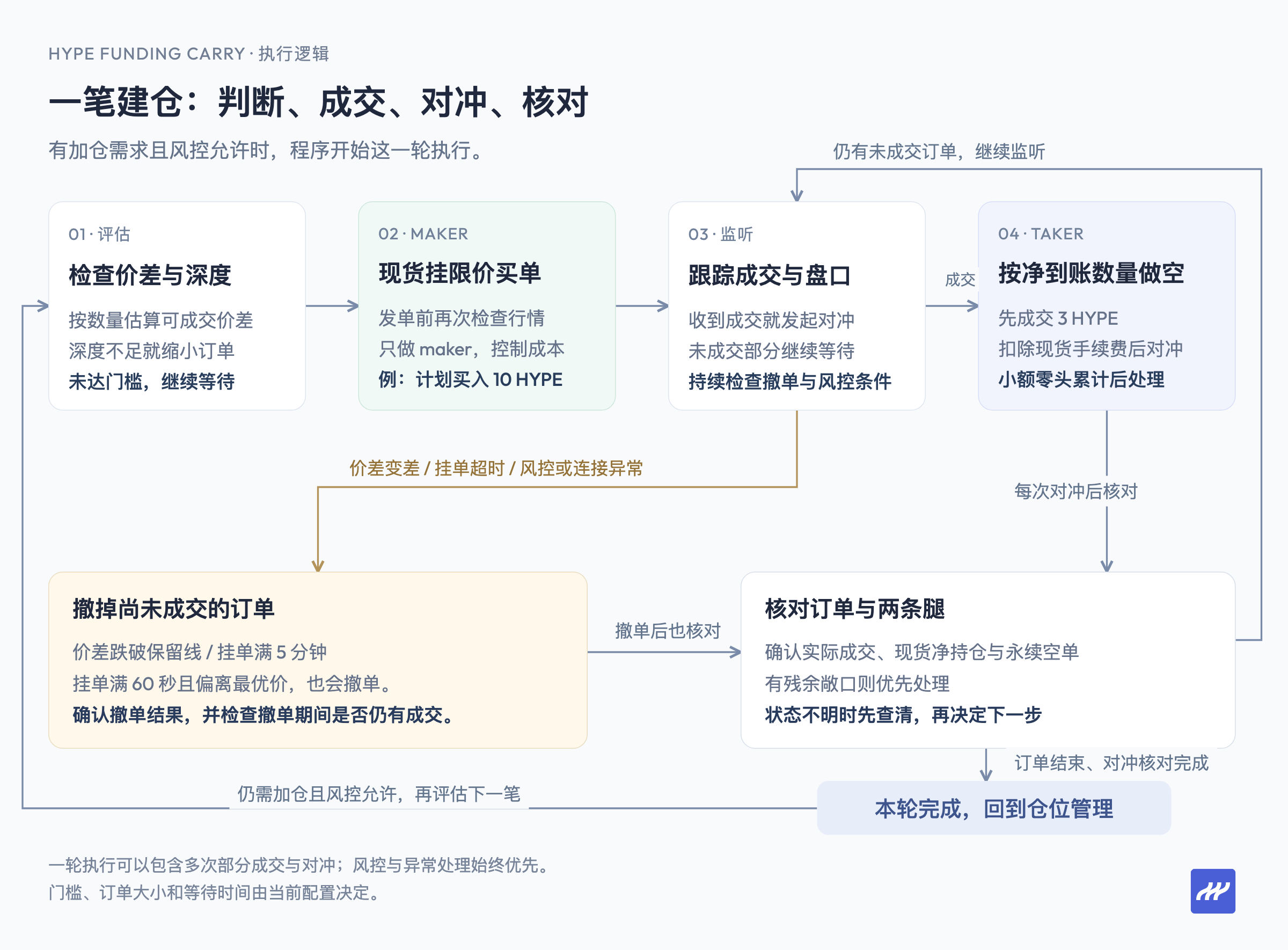
Posting: the program places a maker-only buy order at the best spot bid. If that price would match a sell order immediately, the exchange rejects it, which guarantees the spot leg pays only maker fees. Before sending, the program also rechecks the spread against the latest market data, to avoid the case where "it qualified when calculated but no longer did when sent."
3 filled: the spot buy fee is deducted in HYPE, so after buying 3, slightly less than 3 actually arrives. The program shorts the perp based on the quantity actually received, and the rest of the spot buy order keeps waiting to fill.
What about small leftovers: every Hyperliquid order must be at least $10. If a fill is too small to meet that minimum, the program records it and hedges once enough has accumulated.
Hedging speed: the shorter the gap between the spot fill and the perp hedge, the less price movement costs you. Market data, fill notifications and orders all run over a single connection that is warmed up at startup and kept open: fills are pushed by the exchange in real time with no polling, signing happens locally, and the hedge order goes out directly. In live testing, the program takes about 4 milliseconds from seeing the spread meet the threshold to posting the order, and sends the perp hedge about 1 millisecond after receiving a spot fill notification. The rest of the time is network transit and exchange confirmation, which depends on how far your server is from Hyperliquid; running it in AWS's Tokyo region shortens this noticeably.
This is not professional high-frequency trading speed, but it is more than enough for a funding-rate strategy: spot maker orders have to wait in the queue anyway, positions are held for weeks or months, and funding settles once an hour. Speed matters because it keeps the gap between the two legs as small as possible, and an always-on ordinary computer or cloud server is enough to run it.
When to cancel: a normal maker order is canceled mainly on three conditions: the spread falls below the keep threshold; the order has been resting for over 60 seconds and is no longer at the best price; or the order has been resting for 5 minutes. A disconnect or a risk trigger also leads into the cancel-and-reconcile process. After canceling, the program re-evaluates based on the latest market data.
Exiting works the same way: when reducing, it runs in reverse. Spot is sold with maker orders, and each time part fills, the same amount of the short is bought back. Buying back the short uses reduce-only orders, which guarantees it never flips into a long. In an emergency, you can also choose taker orders to exit immediately.
(Entry, exit, cancel rules)
4. When to Hold, When to Rebalance
Once the position is built, the program does nothing most of the time. It acts only in the situations below, and handles them in a fixed order: risk first, then position adjustments.
Let the Position Drift, Rebalance Toward Target Once It Leaves the Band
In this example config, the target one-leg position is 1.4x the account's net equity, allowed to drift between 1.0x and 1.8x:
- Below 1.0x (for example, after adding capital), it starts adding and stops at 1.4x.
- Above 1.8x, it starts reducing and stops at 1.4x.
- Between 1.0x and 1.8x, the program does nothing; once it leaves the band and starts rebalancing, it keeps going until 1.4x, even if it re-enters the band along the way. Risk controls always take priority.
Returning to the target only when the position leaves the band avoids adding and trimming over and over near the edges and paying fees for nothing.
Rising PMR, Handled in Stages
When the price rallies hard, losses on the short are covered by the system automatically borrowing USDC, and PMR rises. The program handles this in three tiers:
| PMR | Program action |
|---|---|
| Above 0.65 | Stop adding |
| Above 0.75 | Reduce slowly with maker orders until PMR is back to 0.65 |
| Above 0.80 | Reduce quickly with taker orders until PMR is back to 0.72 |
In the last article we suggested "reduce once PMR goes above 0.8." This example parameter set acts a step earlier: at 0.75 it starts reducing with cheaper maker orders, and at 0.8 it prioritizes reducing fast. You can adjust these thresholds and reduction targets.
How Other Anomalies Are Handled
- Unrecognized assets appear in the account: the program stops adding and rebalancing, and only completes hedges and reconciles the account. That is why we recommend running it on a dedicated account.
- The API wallet is about to expire: the program will no longer post orders that might outlive the API wallet's authorization.
- Funding has been negative for the entire past 24 hours: the program logs a warning but does not exit automatically; if you want push alerts, you need to hook up notifications yourself. Short stretches of negative funding are common, and whether to exit is your call.
5. Network Drops, Restarts, and Only One Leg Filling: What Then
Running continuously, the program will run into network drops, restarts, or brief exchange glitches. The first thing to deal with is the two legs losing their hedge: spot was bought but the short was not opened (or the other way around), leaving the account exposed to price moves in the meantime.
The program handles this in a few ways:
- Record before placing orders: before every entry or exit, the program first writes down locally "what I am about to do," and every order has an ID that can be recalculated.
- Reconcile first after a restart: when the program restarts, the first thing it does is not resume trading, but take those IDs to the exchange and check: which orders filled, how much filled, and whether the hedge kept up. Missing hedges are filled in, orders that should be canceled are canceled, and only after confirming the account is back to normal does it start adding again.
- When the legs don't match, fix that first: if the difference between the two legs exceeds $200, or a difference above $10 lasts more than 30 seconds, the program pauses other actions and closes the gap with taker orders first.
- A local run lock prevents duplicate starts: among program instances managing the same account and sharing the same state directory, only one can trade, which avoids duplicate orders. Other machines and other trading programs still have to be coordinated on your own.
(Recovery)
6. Deploying It to Your Own Account with AI
The open-source version was cleaned up from our live code. It runs one account at a time, keeps its records locally, and needs no database server. Continuous monitoring and automatic handling require the program to keep running, so use a computer or server that stays online. The repo includes a set of example parameters you can use as a starting point, then adjust to market conditions and your own needs.
The repo comes with an AI skill. Once installed, Claude Code or Codex knows how to build, configure and run the program (see the repo README for installation). We suggest going in this order:
- Prepare the account: enable Portfolio Margin, create an API wallet (it can place orders but cannot withdraw), and save the private key in a local file. Do not paste it into the chat.
- Read-only check: have the AI run the commands that show status and show the plan. This step does not load the private key or place orders; it just tells you what state the account is in and what the program intends to do. Anything you don't understand, ask the AI to explain until you do.
- Try a small trade: do one entry with $10–50 and watch the full process of posting, filling and hedging.
- Review logs and returns: the program records every order, fill, funding payment and fee locally, and you can ask the AI to summarize them.
- Run for real, and exit: once everything checks out, start continuous running. When you want out, use the exit command to close in batches, confirm the loan is back to zero and no position remains, then withdraw to your wallet.
The AI will only run order-placing commands when you explicitly ask it to at each step. The program can carry out the rules for you, but whether those rules suit you, and when to stop, is still your judgment to make.
Data Sources
- Open-source code and example config: GitHub repository
- Trading fees: Hyperliquid official docs
This article explains how the open-source code works and is not investment advice. The code is provided as is; users bear all risks and losses from using it.